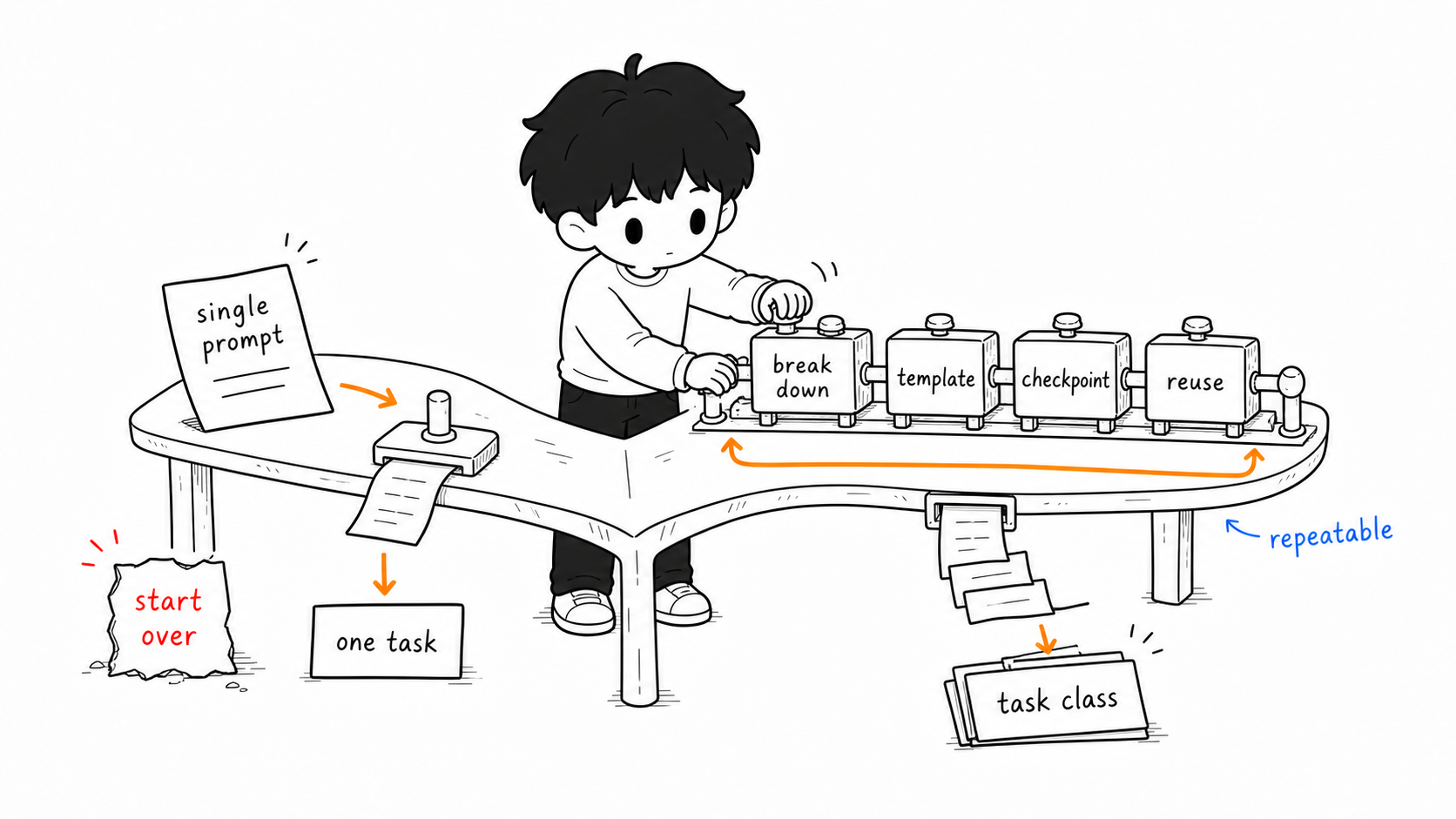
In one sentence: a single question solves one task; a workflow solves a whole class of tasks. Doing one thing well is a skill; doing a whole class of things reliably is a process.
By now you can already ask AI questions, and even have it build small tools. But you may have noticed a problem: every lesson prep means organizing the prompt from scratch, repeated week after week, without really saving much effort. That’s exactly what this chapter addresses—upgrading the one-off question into a workflow you can reuse over and over. This is the key step from “knowing how to use AI” to “using AI to reshape your daily work,” and it’s also the foundation for the “agents” chapter later.
What a Workflow Is, and How It Differs from a Single Question
A single question is “I ask one line, it answers one passage.” A workflow breaks a larger task into several ordered steps, handles each step in a relatively fixed way, feeds the output of one step into the next, and places checkpoints where you vet things along the way.
An analogy: a single question is like inventing a recipe on the spot every time you cook; a workflow is having a fixed routine of prep, cooking, seasoning, and plating—switching dishes just means swapping ingredients, while the framework stays. Lesson prep, grading, problem-writing, home-school communication—these weekly tasks suit workflows best.
A good workflow usually contains four elements: task breakdown (cutting a big task into small steps), fixed templates (a stable prompt for each step, changing only the variables), human-AI division of labor (which parts go to AI, which must be yours), and quality checkpoints (stopping to verify at key nodes). Let’s make these concrete with two real scenarios.
Demonstration One: Preparing a Lesson
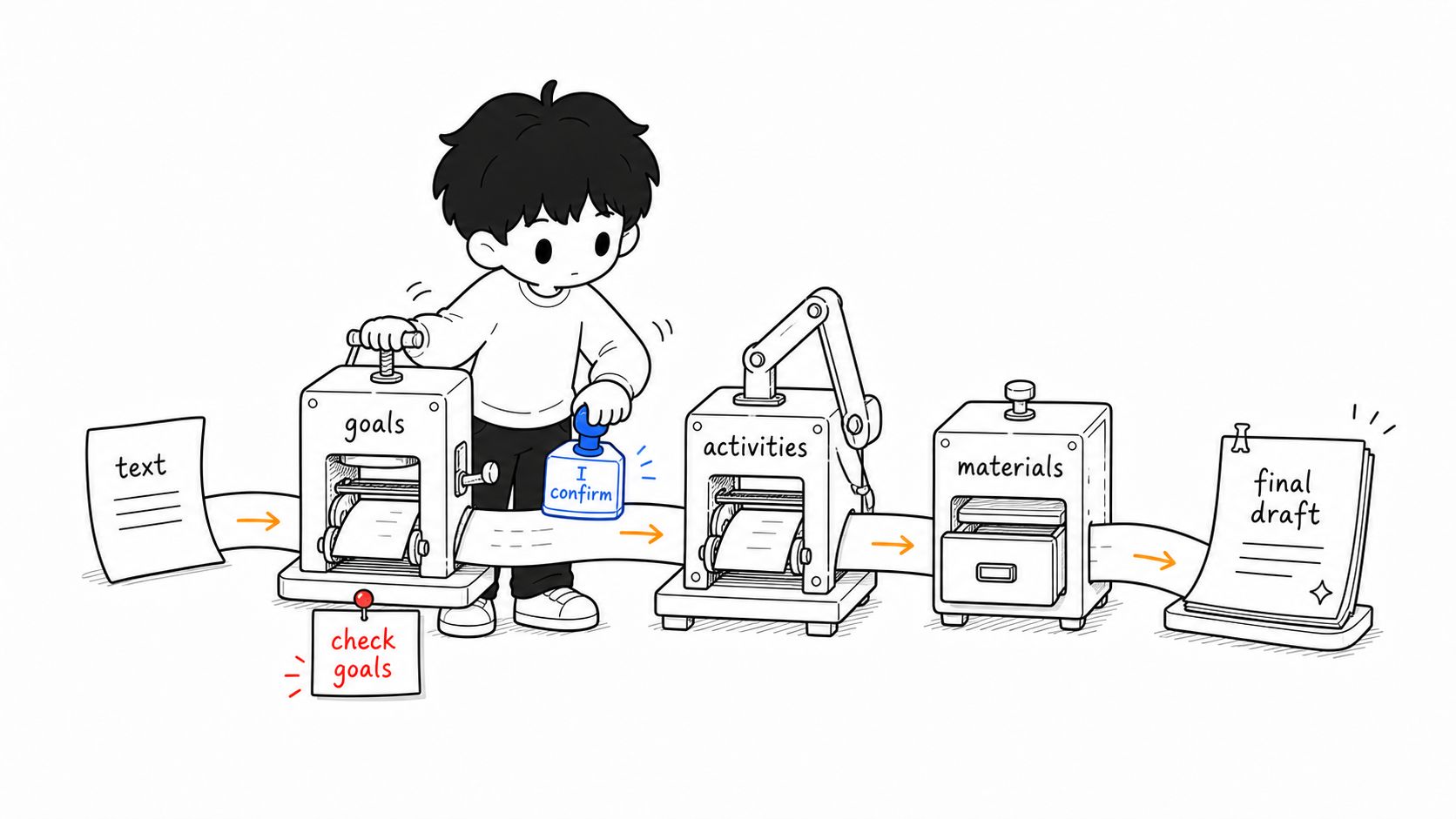
Suppose you’re preparing a Grade 7 language-arts lesson. Rather than tossing out “help me prep this lesson,” follow the broken-down flow below—each step is a question, but the order and division of labor are fixed.
Step one, set teaching goals. Send the AI the curriculum requirements and the textbook text, and have it help you sort them out first:
You are an experienced middle-school language-arts teacher. Here is the
text I'm teaching, "Spring" (《春》) [paste the text]. Based on Grade 7
student level, propose 3 measurable teaching goals, corresponding to the
knowledge, skill, and emotional dimensions. Don't design activities yet.
The output of this step is the goals. Here lies the first quality checkpoint: goals are the direction of your teaching, so you must personally review the AI’s draft and adjust it to your class before moving on.
Step two, design activities based on the goals. Feed back the goals you’ve confirmed:
Based on the confirmed teaching goals above, design the activity flow for
a 40-minute class, with three parts—warm-up, main body, and close—marking
the duration and design intent of each part.
Step three, generate supporting materials. With activities set, have it produce a student handout, exercises, and a board-writing outline:
Based on the activity flow above, generate a student handout and 5 in-class
exercises, with difficulty matching the earlier teaching goals, plus a
reference answer key.
Step four, differentiation. This step is often skipped, yet it shows the value of a workflow best:
For students who are easily distracted and for those who have capacity to
spare, provide one adjusted version each of the main-body segment.
The final step, you finalize. AI gives a coherent first draft, but the classroom is yours—cut segments that don’t fit your class, add details AI doesn’t know, and change the language into your own voice.
Go through it and you’ll find each step’s prompt is reusable almost verbatim next time you prep a different lesson—just swap the text and grade level. That’s the power of templates. Save these five steps into your prompt library and you own a “lesson-prep assembly line.”
Demonstration Two: Grading and Learning-Status Analysis
Grading is another high-frequency, mechanical task most worth turning into a process. Note: the first step of this flow is a red line, not a suggestion.
Step one, de-identify. Before handing any student work to AI, first remove all personally identifiable information—names, student IDs—and replace it with “Student 1, Student 2.” This step cannot be skipped; the reasons are detailed in the next chapter (ethics).
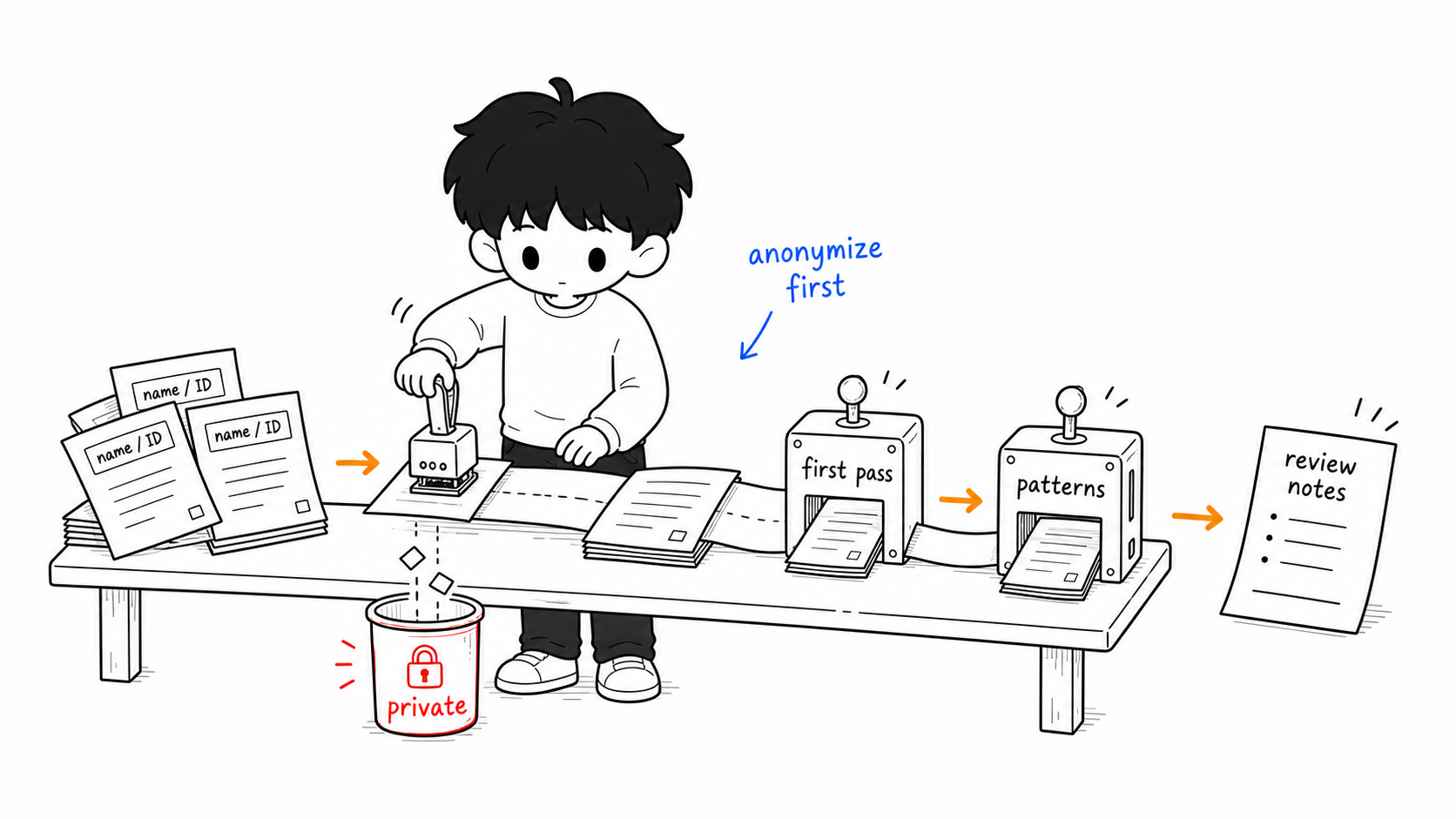
Step two, batch first pass. Hand the de-identified work to AI for a first round:
The following are 30 Grade 7 English essays (de-identified). Mark the
grammar and spelling errors in each, one by one—no scoring, no rewriting,
just list each essay's error list.
Let AI do what it’s good at—mechanical work like catching typos and flagging grammar—while leaving “thought, framing, emotion,” which it judges unreliably, to you.
Step three, summarize commonalities. This is where AI truly spares your brain:
Across these 30 essays, summarize the 5 most frequent common problems, with
a representative example for each, sorted by frequency.
A class-wide list of common problems is the ready-made skeleton of your review lesson.
Step four, you do the review and individual feedback. How to teach the common problems, and what words of encouragement to say to each child—this is education and must be yours. What AI saves you is the repetitive, mechanical parts, so you can spend your time where people are truly needed.
Human-AI Division of Labor: A Simple Dividing Line
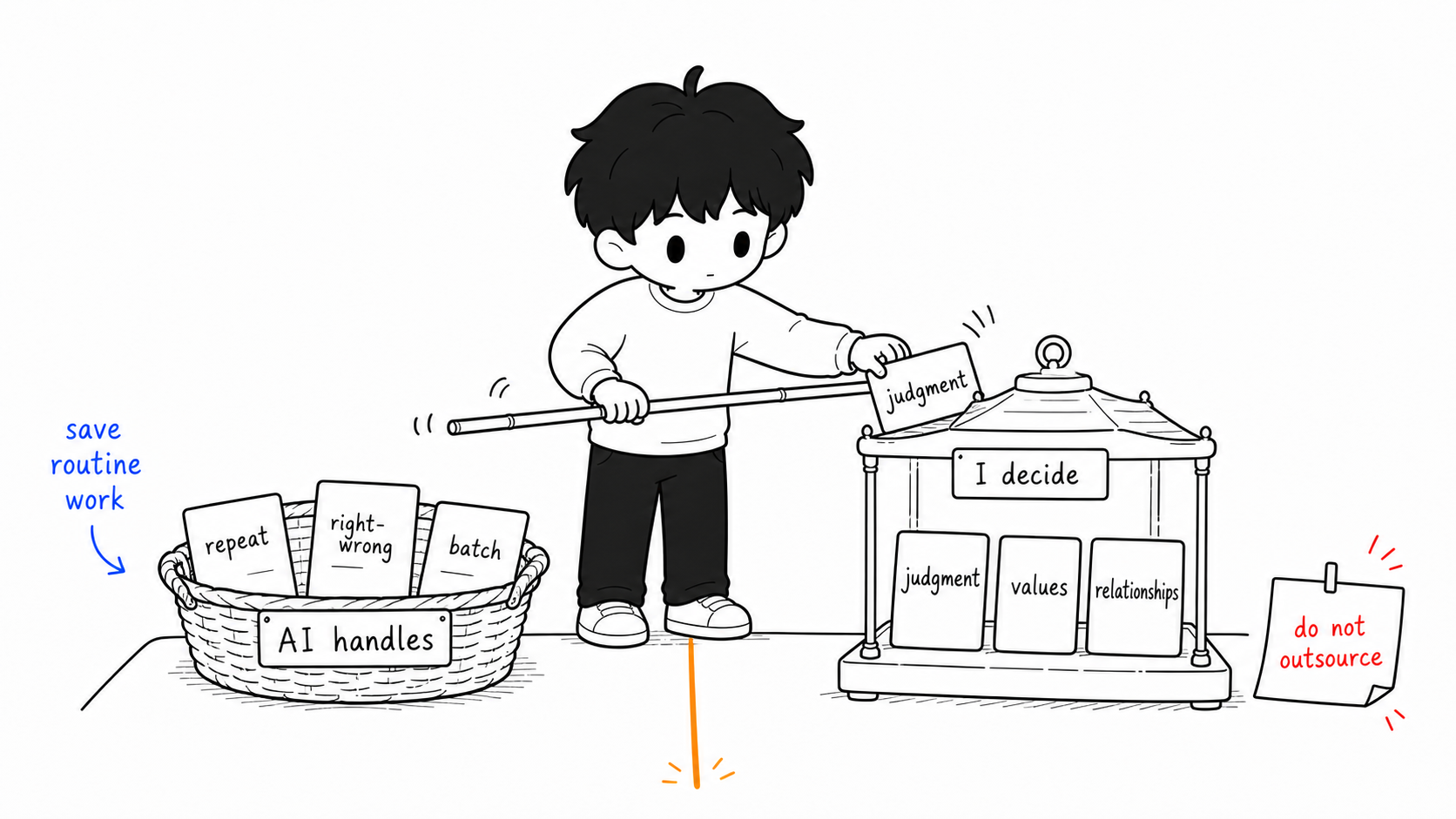
Both demonstrations show the same principle, worth stating outright: give AI the mechanical, mass-repeatable work with clear right and wrong; keep for yourself the work involving judgment, values, emotion, and relationships. Catching typos goes to AI; judging whether an essay is good stays with you. Aggregating data goes to AI; deciding how to talk with a particular child stays with you. Draw this line clearly and you’ll neither waste AI’s compute by being afraid to use it, nor push out work you should be responsible for by misusing it.
Going Further: “Solidify” a Workflow with a Dedicated Platform
The two demonstrations above both advance step by step in a single chat window—very flexible, but you have to run each step by hand each time. If some process repeats every week, consider using a dedicated workflow platform to “solidify” it into a process that runs with one click, or even automatically. A common domestic choice is ByteDance’s Coze; a representative open-source one overseas is Dify—neither requires writing code, and you build by dragging and dropping.
The idea of such platforms is to break a process into individual “nodes” and connect them with lines. Common nodes include:
- Input node: receives what you give, such as a text passage, a topic, or an uploaded file.
- Web/scraping node: automatically fetches material online, such as the content of a policy page or a news article.
- LLM node: calls an LLM to process the previous step’s content—summarizing, rewriting, generating problems—which is where you fix your prompt.
- Conditional-logic node: branches by rule, e.g., “if a student scores below 60, take path A and generate remedial exercises; otherwise take path B.”
- Output node: organizes the result into the form you want and sends it out.
For example, the “lesson prep” flow above can be built on Coze or Dify as: you input a text → an LLM node generates teaching goals → another LLM node generates activities and exercises from them → output as a complete document. Once built, next time you prep, just drop in a new text and the whole flow runs by itself, with no need to type line by line. A task like “monitoring research literature,” which needs online fetching, can also be assembled from a scraping node plus an LLM node.
Whether to use a platform depends on whether the process is worth the one-time effort to build. For something you do occasionally, running it by hand in a chat window is fine; for something you repeat without fail every week, spending the effort once to solidify it on a platform is the most worry-free in the long run. This is also the step toward the next chapter on “agents”—when a process can not only run with one click but trigger itself on a schedule, it starts to feel like an assistant that works on its own.
How to Build a Workflow of Your Own
Pick something you repeat every week that gives you a headache—weekly reports, parent notices, unit quizzes, mistake collections, anything. Then break it apart with the four questions below:
First: into what steps can this be broken? Turn it from “a lump” into a few ordered small steps. Second: who handles each step? Mark each step “AI does” or “I do.” Third: for the steps AI does, can the prompt be fixed, leaving only a few blanks for me to fill each time? If so, write it into a template with blanks and save it. Fourth: where do the quality checkpoints go? After which steps must I stop to verify and not let errors pass downstream?
Write down the answers and you have your first workflow. Building it the first time may take some effort, but it’s a one-time investment for long-term reuse. Once it runs smoothly, the repetitive labor in your daily work will visibly shrink—and the time you save goes right back to the teaching that most needs a human.
Next chapter goes a step further: when a workflow is mature enough, can AI run it to the end without you prompting each step? That’s the question agents answer.
This article is part of the A Teacher’s Guide to AI series. For specific sources, references, and AI-use notes, see the series index page.